Side effects may include free evenings and suspiciously well-prepared villains.
Foundry VTT V12 · V13 · V14
dnd5e 4.0 and newer
Windows, 64-bit
Runs on your existing AI subscription
English and German
Inside the app
Behind the GM screen
Real screenshots from Enhanced DM, made with invented demo data.
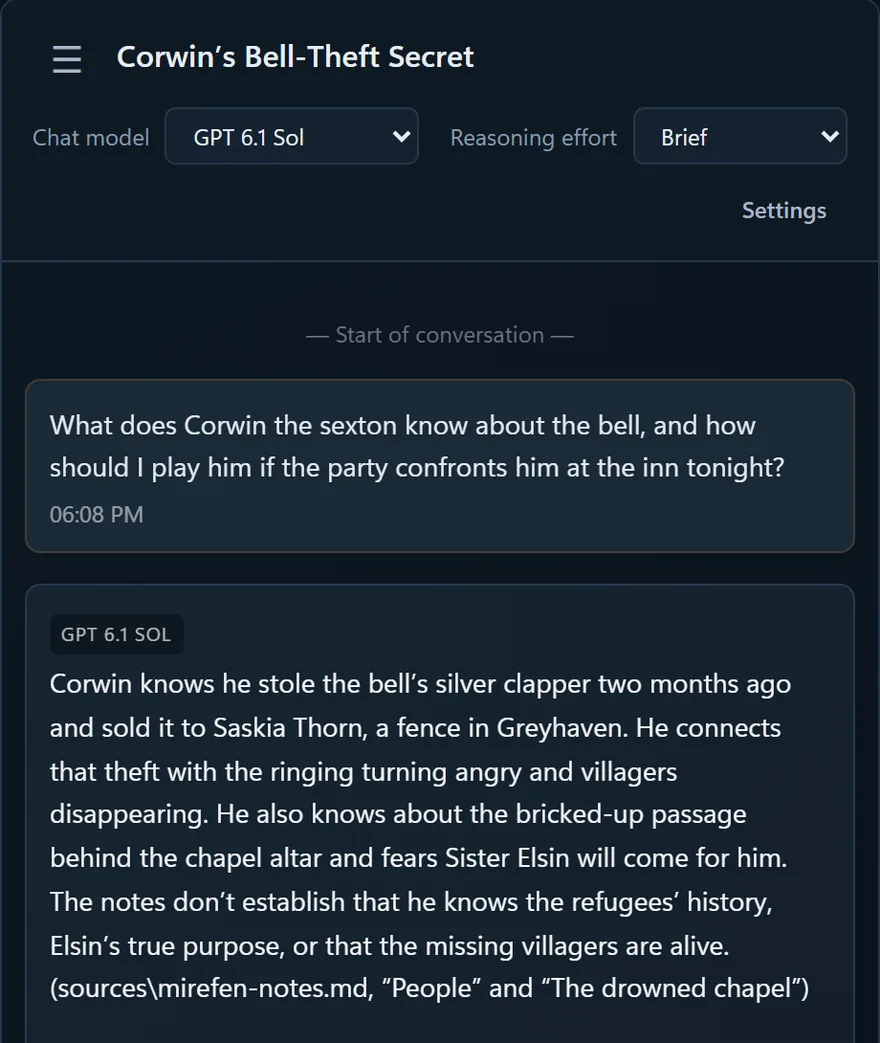
Campaign chat
Ask about your campaign in plain words. The answer comes from your own notes, names the source, and keeps the notes' facts apart from its own suggestions.
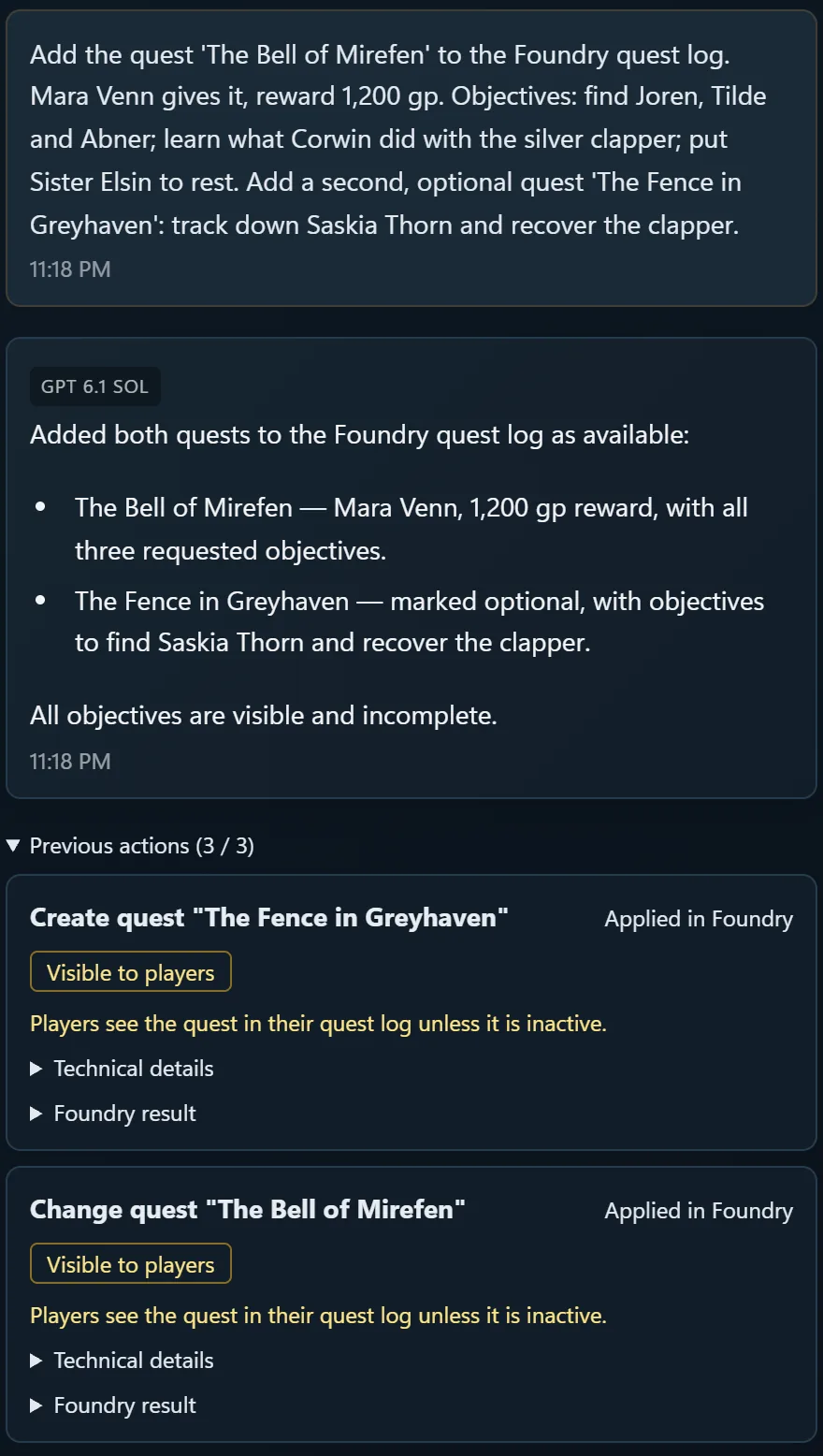
Acts in Foundry
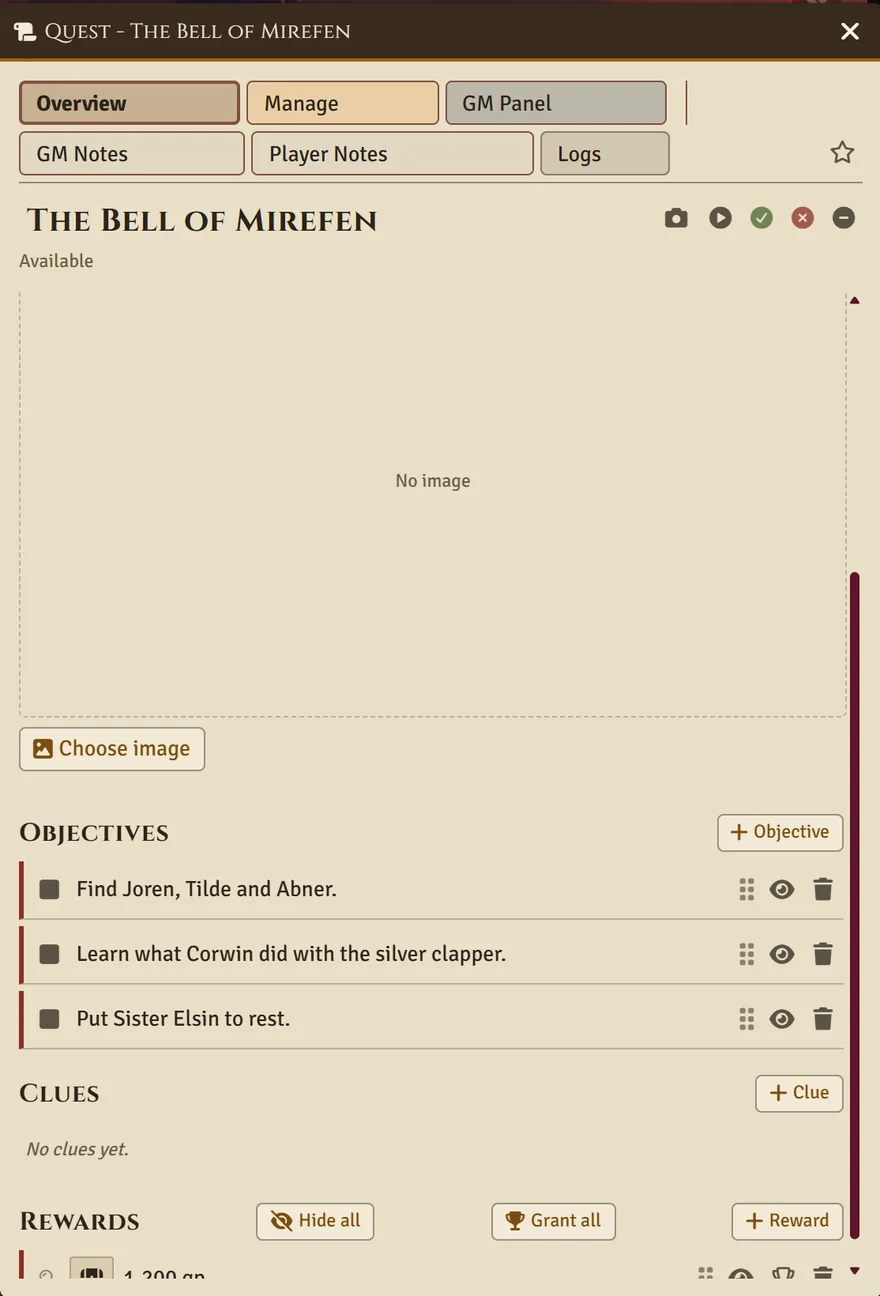
Ask in the chat and it happens in your world. Here the chat wrote two quests into the Foundry quest log, with objectives and a reward. Every change is listed under the answer.
In the chat
In Foundry V14
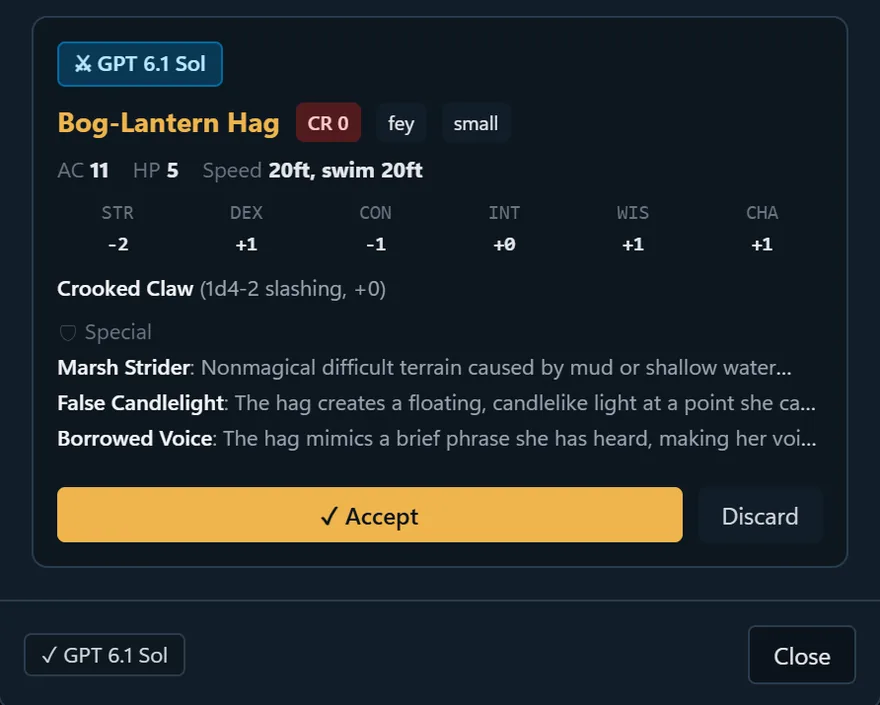
The forge
Describe a creature in one line and get a stat block you can accept or discard.
Prompt: "Bog-lantern hag who lures travellers with false candlelight"
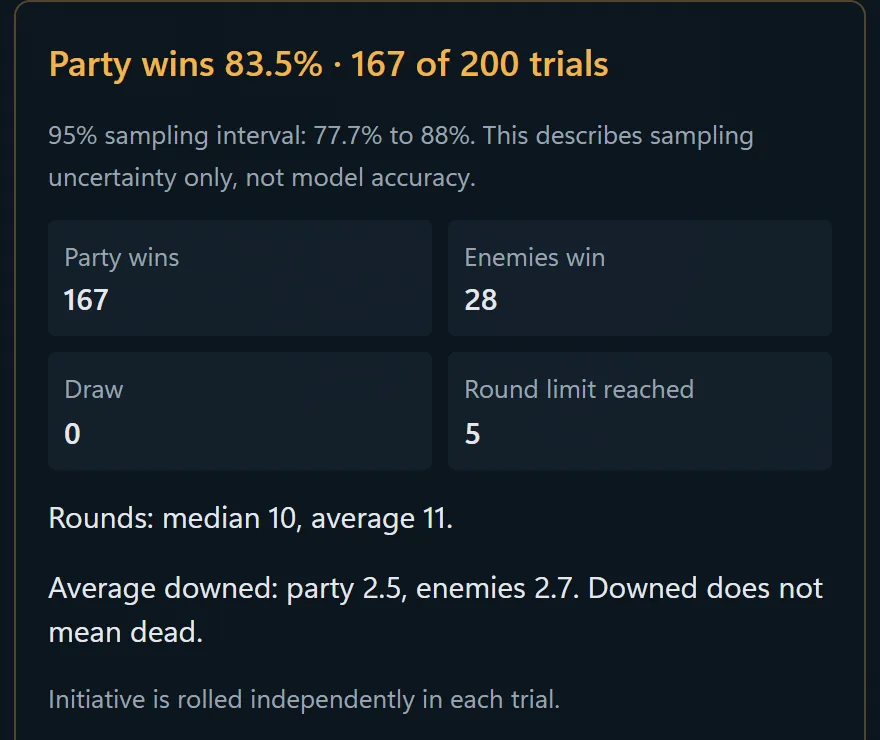
Encounter simulator
Play a fight 200 times before the session. It reports how sure it is and where its model stops.
What it does
A natural 20 on every prep check
The session starts in an hour, and the party went somewhere you never planned for. Enhanced DM reads your world and your notes and does the legwork. Before the session, or during it.
Campaign chat
A chat with high Wisdom
Ask who is in the party, what the cult wants or which NPC the players insulted last month. The chat answers from your Foundry world and your uploaded notes. It can also place tokens, prepare an encounter or update a journal, within your Game Master rights and the access level you set.
Quest tracker
No side quest required
Built into the connector. Create quests, track objectives and share them with your players in Foundry. Existing MasterQuest data is copied over, never deleted. Forien's Quest Log keeps working too.
The forge
Forged, not phoned in
Generate NPCs, monsters, items and maps from a short description. Images open in a large view. A finished map goes into Foundry as an inactive scene, uploaded through Foundry's own file manager.
Images need Codex (OpenAI) or Antigravity (Google).
Encounters and loot
Roll initiative, not spreadsheets
Build an encounter against an XP budget, test it in the simulator and start the fight in Foundry. Then hand out the loot. The simulator is a prep aid and never changes your world.
Push-to-talk
Now with a verbal component
Hold a key in Foundry and speak instead of typing. Your own PC turns the speech into text for the chat. Your Foundry microphone stays muted while you hold the key, so the table does not hear you plotting.
Needs the optional local voice runtime, about 29 MB, set up from Settings.
Session log
The bard's job, minus the bard
Record a session with one button in Foundry. Each microphone gets its own track, transcribed on your PC. Enhanced DM then writes a report and can file it as a Foundry journal. Recording never starts on its own.
Tell your players before you record.
Music
Bardic inspiration on demand
Write a music prompt, create the track in your own Suno account and import the MP3. Listen in Enhanced DM, then send it to Foundry when it fits the scene.
Needs your own Suno account and its credits.
Player link
Open a portal, not a port
Hosting Foundry on your own PC? Enhanced DM creates a temporary HTTPS link through Cloudflare that players open in the browser. No domain, no router setup.
How it works
Setup without a saving throw
No terminal, no config files. Plan for about 20 minutes.
Install the app
Download the Windows installer with your license key or your Patreon sign-in and run it. Everything Enhanced DM needs to run comes with it. Then activate it the same way.
Pick your AI
Choose Codex (OpenAI), Claude Code (Anthropic) or Antigravity (Google) and sign in with your own account. The subscription you already have does the work, and its full plan is yours. Enhanced DM can install the assistant for you.
Connect Foundry
Click Install / update Connector in Settings, enable Enhanced DM (5e AI Assistant) in your world and click Connect. Enhanced DM sets up the address and key itself. It does not copy or change your world for this.
Foundry at a hosting service? Copy the connector's manifest link from Settings, paste it into Foundry's Install Module dialog and connect the same way. Foundry keeps the connector up to date.
Your hoard stays in your lair
Campaign data, chats, notes, recordings and settings live on your PC. Ironstead never receives them. When you ask the chat something, Enhanced DM sends your question and the campaign context it needs straight to the AI provider you chose, under your contract with them. No AI request ever passes through an Ironstead server.
A license key is checked offline. A Patreon membership renews in the background through the license server, and Enhanced DM keeps working offline for up to 35 days.
Compatibility
Proficient in Foundry V12, V13 and V14
Built for the dnd5e system, version 4.0 and newer. Some features need a newer Foundry. Where an API is missing, the connector names the version it needs instead of failing halfway.
Feature
V12dnd5e 4.x
V13dnd5e 5.x
V14dnd5e 6.x
Chat, documents, scenes, music, images
✓yes
✓yes
✓yes
Quests
✓yes
✓yes
✓yes
dnd5e rules: attacks, saves, damage, spells
✓yes
✓yes
✓yes
Session recording
✓yes
–no
✓yes
Token movement, pathfinding, opportunity attacks
–no
✓yes
✓yes
Areas and summons on the map
–no
–no
✓yes
Day-to-day use happens on V14 with dnd5e 6. The dnd5e actions were also checked live on V12 (dnd5e 4.4) and V13 (dnd5e 5.3).
Pricing
Every hero needs a patron
Two ways to unlock Enhanced DM. Pick the one that suits your coin purse.
License key
Buy a key
Coming soon
One key, pasted once
Checked offline on your PC
Until then, Enhanced DM is available through Patreon
Patreon
Become a patron
€10 / month
Sign in with Patreon, no key to copy
Renews in the background while your membership is active
Works offline for up to 35 days
Tier: Early Access. Supporters test Enhanced DM first
Both need Foundry VTT and an AI subscription with OpenAI, Anthropic or Google. Enhanced DM works with the plan you already have.
FAQ
Roll for insight
Do I need my own AI subscription?
Yes, and you may already have one. Enhanced DM works with Codex (OpenAI), Claude Code (Anthropic) and Antigravity (Google). Sign in once with your own account and Enhanced DM uses your plan, billed by the provider as usual. Images need OpenAI or Google.
An optional AI allowance from Ironstead is planned. We still recommend your own subscription: you get your provider's full plan, and your requests stay between you and them.
Do my AI requests go through your servers?
Never. Enhanced DM runs the provider's own assistant on your PC, and every request goes straight from your PC to OpenAI, Anthropic or Google. Ironstead's server only checks your license.
Will it mess with my world?
Installing and connecting the connector does not copy or replace your world. The chat changes only what your Game Master permissions and the Main chat access setting allow. The encounter simulator never touches Foundry.
Which game systems does it support?
dnd5e, version 4.0 or newer. Other systems are not supported.
Does it run on Mac or Linux?
The app is Windows only for now, 64-bit. Foundry itself can run anywhere, including a hosting service.
Do my players need anything?
No. They play in Foundry as usual. If you host Foundry on your own PC, the player link gives them an HTTPS address without router setup.
Why does Windows warn me on first start?
The installer does not have a Microsoft code-signing certificate yet, so Windows shows "Windows protected your PC". Click More info, then Run anyway.
Is there a German version?
Yes. The app, the connector and this site speak English and German. The app follows your Windows language, and you can switch it under Settings → Language.
Where do I get help?
In the app menu, choose Create support package and email the file to contact@iron-stead.com. It holds logs and version details. Passwords, keys and campaign data stay out.
Your players will think you prepped. We won't tell.
Install Enhanced DM, connect your world and ask your first question tonight.